China 2014

Pam travelled to Yunnan, China in the spring of 2014 to hunt for Primulas. Click image for more...

Primula Rediscovered

Primula bracteata and Primula bullata are found in their type locations after 125 years.

Near Lhasa, Tibet

How do you tell the difference between P. tibetica and P. fasciculata?

Primula ambita in the Wild

The first ever cultivated plant caused a stir at Chelsea earlier this year.

New Primula Book

The latest Primula book is a revision of the 106 species of Primula found in India.

Showing posts with label techniques. Show all posts

It's About Time

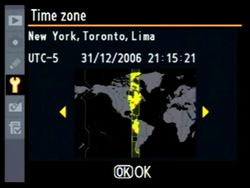
Botanical travel can take you close to home or far away, perhaps, the other side of the earth.  The nearest antipodes to me is Port-aux-Francais in the Kerguelen Islands which would be interesting to visit, but it isn’t a place where Primulas grow. My last botanical trip started in Kunming, China after 23 hours of travel and all I wanted to do after landing was to eat and sleep. But in the list of many things you need to do when you arrive, there is one task people forget to do – set the clock on your camera to local time.
Set the local time on your camera
Why would you want to do that? If you are like me, when you get back home you are faced with the daunting task of organizing thousands of images taken on the trip. With the help of photo manager software you can quickly find that special image later on when putting together a presentation or sharing with friends. Some of these programs are free, others you pay for either by buying outright or by renting monthly. I use Adobe Lightroom.
Exif data
Every time you take an image with your camera, basic information or metadata is stored with that image in exchangeable image file format (Exif). The data includes the make and model of your camera and the date and time the image was captured. Photo manager software allows you to sort based on the Exif data included in your images. You can find all the images taken on a particular date or maybe those taken with a particular camera, if you were using more than one (or a camera and a cell phone for instance). If you haven’t set your camera time, some of your images may appear to have been taken near midnight and others the next day, when in reality all of the images were taken in the afternoon on only one day!  If you can accurately sort the images by time, then it makes it easy to find all the images taken at a particular time and add tags to describe locations and plant names to your images. You can also rate your images. With this done, it is a simple task to find your very best images of a plant taken at specific place.

Don’t forget to set you camera clock back when you get home!

Going around in circles - Primula minutissima, Victor Jacquemont, and Mangled Maps

Primula minutissima
It's my curiosity that not only keeps me interested in studying Primula species, but also leads me to exciting side trails of investigation. Such is the case of Primula minutissima, which I was researching yesterday. Looking at several sources of information, the distribution of the species is given as NW & W Himalayas. As this is a large area, I wondered where the type location was.  Most of the images in Primula World are from the area near Rupin, Nalgan and Hampta Passes in Himachal Pradesh. Looking to the original description in “Prodr. [A. P. de Candolle] 8: 42. 1844”, the location is given as “Ghanti India”. So where is that? Smith & Fletcher don’t mention the exact type location in their description of P. minutissima – only that the type sheet is in the Paris herbarium. Sometimes detailed collection information is given on the herbarium sheet, so I looked to sheets P04544185 and duplicate P04544180 to see if there were clues there. Nothing! According to Smith & Fletcher, Royle first collected this species in Kunawar in 1831, but Duby used Jacquemont’s collection #1537 to describe the species. So that started me down the path of investigation into Victor Jacquemont.
Victor Jacquemont - from Bibliotheque nationale de France
Victor Jacquemont was born in 1801, but sadly lived a short life, dying in 1832 at age 31. Despite his young age, he was part of the intellectual circles of Paris in the 1820’s and his botanical contacts included Adolphe-Théodore Brongniart who worked at the Muséum National d'Histoire Naturelle and Adrien-Henride Jussieu who worked at the Jardin des Plantes. It was Pierre Louis Antoine Cordier from the Muséum who invited Jacquemont to India, which he accepted, departing in August 1828 and arriving in India nine months later in May 1829. He continued his travels to Delhi, arriving in March 1830, and then he headed north into the Western Himalaya. He made extensive collections and notes of plants (4787 entries at Paris) and animals, made drawings, recorded observations in geology, geography, meteorology and anthropology and famously wrote many letters to friends and family. In March 1832 he became ill and eventually succumbed eight months later on July 30th. Posthumously his notes, drawings and letters were published.

A search led me to Raj Kumar Gupta’s paper "Botanical explorations of Victor Jacquemont (1801-1832) (PDF)" which gives a description of Jacquemont’s life and which includes a simple map of his route in the Himalaya. Unfortunately there is no place marked “Ghanti”. Gupta says that after Jacquemont’s death his notebooks were received in three parts: V1 Calcutta to Delhi and the Himalayas Nos. 101-2528, V2 Punjab and Kashmir Nos. 1-1541, V3 Delhi to Bombay Nos. 1-818 and also a separate volume enumerating his notes on Hortus calcutensis. It is unfortunate that these original documents don’t seem to be online as the connection could be made from the collection number to a date and then location details in his diary. Maybe there is a clue in the Muséum National d'Histoire Naturelle booklet on Jacquemont (published in 1959), but it is not online either. 

Foiled by Google

With such fame, I thought it would be easy to find a map detailing Jacquemont’s route in the Himalaya, but it proved more difficult than I thought. I looked in the books of Jacquemont notes and letters published posthumously (listed below). In one book, I was able to find a mangled map. RANT – all very nice that old books are scanned by Google (and others), but maps are rarely unfolded and scanned so all we see is a tantalizing piece of a mangled map! Eventually I found a version of the book with the map scanned properly - but the map isn't of sufficient resolution to read the names.

That meant I had to look for other sources of maps from that time period. One of those sources is "The Jummoo and Kashmir Territories: A Geographical Account" by Frederic Drew but once again the maps were scanned in a mangled version. However, I was rescued by PAHAR, which keeps a digital dataset of old maps, specifically those from the Indian subcontinent, pre 1899. Drew's maps didn't help, but the 1874 map "Route Map For Western Himalayas and N India by Montgomerie" was promising but too complex to read. Another map included in "Victor Jacquemont dans l'Himalaya (1830-1831)" by Emm. de Margerie has a map of Jacquemont's route in Kashmir (page 402) but it isn't of high enough resolution to view.
The Buspa Valley from Sungla by Samuel Bourne 1865
Going back to the Jacquemont books, I was able to find references to "Bouroune-Ghanti", variations on the name's spelling - Bouroune, Bourando or Burunda, and where it was located. Some more searching led me to the earlier spelling of "Boorendo" and the paper "Narrative of a journey from Caunpoor to the Boorendo Pass" by Lloyd and Gerard and a simple map showing the pass connecting the Pubbur (Pabar) and Buspa (Baspa) river valleys. Now it all becomes clear and I find I have travelled in a circle...we are at Rupin Pass! According to Montgomerie's map Burunda and Rupin passes may lie side by side, possibly with Burunda at 31°23'15.44"N  78° 8'43.83"E and Rupin at  31°21'7.21"N  78° 9'18.02"E.

Of course, that's what I discovered yesterday. Perhaps more information will come to light another day...
 

  1.  Correspondance de V. Jacquemont avec sa famille et plusieurs de ses amis: pendant son voyage dans l'Inde, 1828-1832 (various editions).
  2. Letters from India: describing a journey in the British dominions of India
  3. Voyage dans l'Inde.

Looking for Primulas in Google Earth Pro (now free)

Primula caveana on the Bimbi La, Tibet by Anne Chambers
Using Google Earth to plot botanical expedition routes - old and new - and to locate type locations and plot species distributions has become the norm for me. I like the visual representation of the data. Places can be marked and saved with both old names and new and that helps when you are reading old journals, field notes and books about botanical expeditions.
Besides viewing this data as a flat map, you can tilt the perspective to see the area in 3D. You can "stand" on a pass and look into the distance and see the peaks as you would on a clear day, just like perhaps George Sherriff did. How cool is that?! If you are a computer geek like me, you will soon want to capture a route as a video, swooping down valleys and soaring over passes as if you can fly through the air. With the free version of Google Earth, there was no ability to capture video. You needed the Pro version which cost about $400US. Now Google has released the Pro version for free.

Download the software on Google using your email address and the key GEPFREE. Even though it may say trial version, it isn't.


The video is one I just created with Google Earth Pro. The white line is the approximate route travelled by Ludlow & Sherriff in 1933 from Singye Dzong over the Kang La in Bhutan. Singye Dzong is located at 27°58'23.37"N 91°17'44.15"E. Primula eburnea was collected at the Tsho Kar (White Lake), on the way to the pass. In the distance, the yellow line marks the border between Bhutan and Tibet.
Primula eburnea, near the Kang La, Bhutan by George Sherriff courtesy RBGE archives
In October, 2013, more than 1,000 devotees trekked to Singye Dzong and the lakes for a special drupchen ceremony. Another blog post about travel in this area. Unfortunately this area isn't open to foreign tourists.

Did you know you can view historical imagery on Google Earth? Over time, a place may be imaged repeatedly for display on Google Earth. You may think that the currently displayed image is the best, but sometimes clouds can get in the way. To look at the Bimbi La, Tsari in Tibet, it is better to look at a historical view.
Current image of the Bimbi La on Google Earth
Historical image of the Bimbi La on Google Earth

Bringing Seeds into Focus


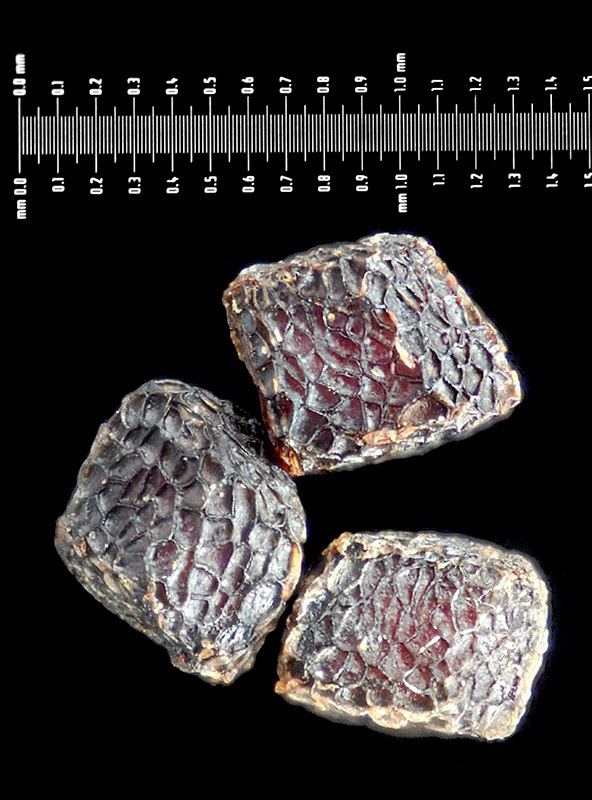
Have you ever seen the book “Seeds:Time Capsules of Life” by Kesseler & Stuppy? It’s a gorgeous coffee table book of false-colored scanning electron microscope (SEM) images of seeds. These types of images can show wonderful detail at the microscopic level and give us more information to help distinguish between species. Primula seeds aren’t quite as fascinating as some of the seeds depicted in the book, but they do have minute details that make them interesting (see the SEM image above of a Primula seed that I false-colored ).  And though you can buy old scanning electron microscopes on ebay, this technique is out of reach for the majority. However, taking optical images of seeds can be done with minimal equipment, just as long as you are able produce magnification in the range up to 10X. This can be done with specialized lenses (like Canon’s MP-E 65mm), by reversing wide-angle lenses (like 24mm or 20mm) with a reversing ring (like Nikon’s BR-2A) or by attaching microscope lenses to the camera directly with an adapter (see this page on photomacrography.net). Or you can take images through a microscope using a camera adapter. If you want to add a scale to your image a micrometer slide is useful.
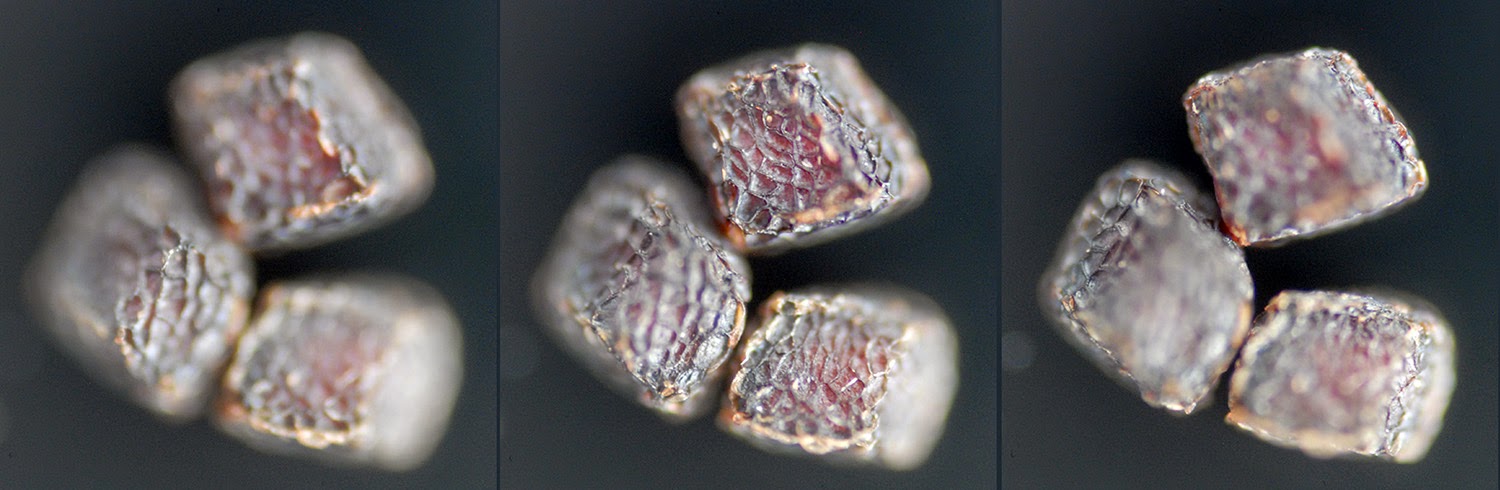
Focus slices
 
Primula brachystoma seeds focus stacked

The problem you encounter when taking magnified seed images is that the whole seed will not be in focus in a single image because of the narrow depth-of-field. In order to create an image with the whole subject in focus, we use a processing technique called "focus stacking". There are many good programs that do this as listed in the link, but I happen to use Zerene Stacker. This program combines the in-focus parts of multiple images taken with overlapping focus points to create an image that has the subject completely in focus.

So why would we want to look closely at Primula seeds?

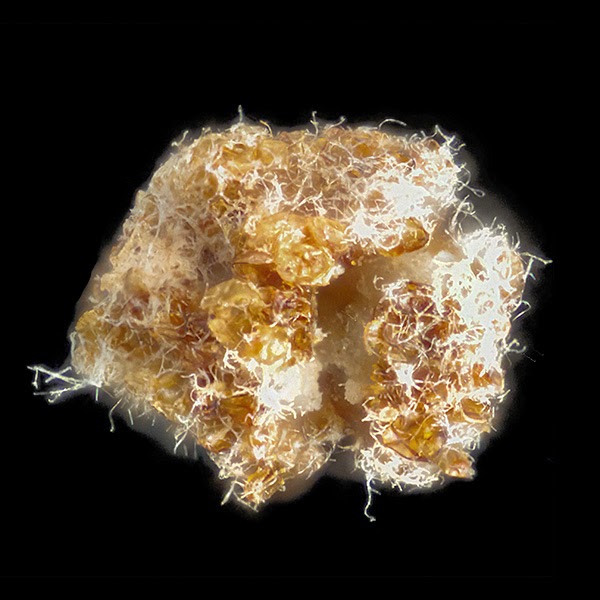
A broken Primula agleniana seed attacked by fungus

Do you know what you area getting in a package of seeds? Even if you don't take an image of your seeds, looking at the seeds closely may reveal that there is more than one type of seed in a package, there is chaff or sand, or that some seeds are broken and molding. Keeping a images of your seeds allows you to compare with seeds that are supposed to be of the same species and can uncover misidentifications.
And it's really fun to uncover the hidden beauty of Primula seeds!

My Camera has the Blues

Color is a tricky thing when describing and photographing flowers. Not only do people differ in their understanding of what is meant by color terms, our cameras “see” colors in different ways than we do.

Primula nanobella color variation.
Words used to describe the most common range of Primula flower colors include violet, blue, mauve, lilac, pink, pinky-violet, blue-violet, amethyst, rose, violet-blue, claret-red, red, wine, purple-blue, purple, magenta, crimson, salmon, magenta-crimson, rose-crimson, rose-purple, lilac-mauve, and rosy-purple. It’s hard to figure out these colors unless you can compare them side-by-side.
 
Ah, but we can take a picture of a Primula flower described as “lilac-mauve” and that will show precisely what is meant! Well, except there are problems with how colors are reproduced in an image.

Light has a color temperature, measured in Kelvin (K). Numbers over 5,000 K represent the cool, blue end of the scale and less than 3,000 K represents the warm, red end of the scale. Often when we speak about color temperature in relation to digital cameras we talk about the white balance.


Most cameras have pre-sets for white balances such as “sunny”, “cloudy”, and “auto” which tells the camera what color temperature to expect in the scene so that the color can be balanced back to neutral. On the “sunny” setting more blue is added to the image, and on “cloudy” more yellow is added. If you have your camera on the wrong setting you will get a strong color cast to your image (which can be used creatively). In the image below, the same Meconopsis has been photographed with different white balance settings. The left image has a slight blue color cast, and the right image has a strong yellow color cast. Without the visual clue of the background to help us see the color cast, we could think the flowers in the images were different colors.
Same plant with different white balances
The camera model used to take images can also cause problems with color. Camera manufacturers add internal infrared blocking filters to their cameras to add clarity to images. This also cuts out some of the visible red in images so Primula flowers can turn from violet to blue depending on the camera used. Fortunately software can be used to correct for this, but this requires some knowledge of the actual flower color or knowledge of the camera and how it represents colors.

Two cameras record the same species differently