China 2014

Pam travelled to Yunnan, China in the spring of 2014 to hunt for Primulas. Click image for more...

Primula Rediscovered

Primula bracteata and Primula bullata are found in their type locations after 125 years.

Near Lhasa, Tibet

How do you tell the difference between P. tibetica and P. fasciculata?

Primula ambita in the Wild

The first ever cultivated plant caused a stir at Chelsea earlier this year.

New Primula Book

The latest Primula book is a revision of the 106 species of Primula found in India.

Showing posts with label photography. Show all posts

Photographing Primula in the Wild

Pam Photographing Primula agleniana in Tibet
One of the joys and pleasures of administering Primula World is seeing wild Primula images taken by others while travelling. Not every person is a world-class photographer or owns the best camera equipment, but that doesn't mean their images aren't exciting or useful. Even blurry images taken in poor lighting, can show variation and details of a Primula which can further our understanding of that species. I'm happy to see even one image, but it is always better to see many images of a species. See the Primula World image submission guidelines to see how you can be a part of Primula World. 

There are several key characteristics that when photographed can be helpful in identifying and documenting a species:

Flowers: Since the flower face is the prettiest part of the plant, it is the most photographed. Images can show useful details such as whether the flower is annulate or not, the position of the style, farina presence, hairs in the throat, petal shape and color patterns surrounding the eye. If the flowers are hanging, then don't forget to tilt the flower up to see the face! A thorough study would include splitting the flower open to see inside. It is rare that a single image of the flower face is enough to identify a species.

Flower faces (L to R): P. waltonii, P. bella, P. poisonii
Flowers are usually arranged in an inflorescence and the details of this arrangement and the length of the pedicels (which attach the flowers to the inflorescence) are important. The inflorescence is supported on a flower scape which varies in height and also in texture.
Classic spike inflorescence of P. vialii
with diagnostic red calyces.
Calyx, Tube & Bracts: It is just as important to photograph the back or side of the flower as it is to photograph the front. This shows the calyx, which is the outer most part of the flower (it protects the flower bud) and is composed of 5 sepals. How deeply the calyx is split into sepals and the shape and length of each sepal is very important to see. This view also reveals the floral tube which may vary in length and color. Bracts are modified leaves found at the base of the inflorescence that vary in shape and size.
Calyx, Tube & Bracts:
P. munroi (L), P. longipetiolata (R)
Leaves: It is no surprise that leaves are important in determining a species. They come in a variety of shapes and some species even produce more than one type of leaf during the year. Venation can be seen. Many species have farina on the leaves especially on the lower surface or hairs which may be photographed with extreme close-up lenses. The best leaf images are when a leaf is removed from the plant, with the petiole intact, and both sides are photographed, preferably with a scale.
Leaf studies: P. blini (L), P. advena (R)
Farina: Most Primula species produce farina, a powdery substance that may coat any part of the plant. Farina may be white, cream or yellow and may appear to be absent if washed off by rain.
Glandular hairs secreting farina
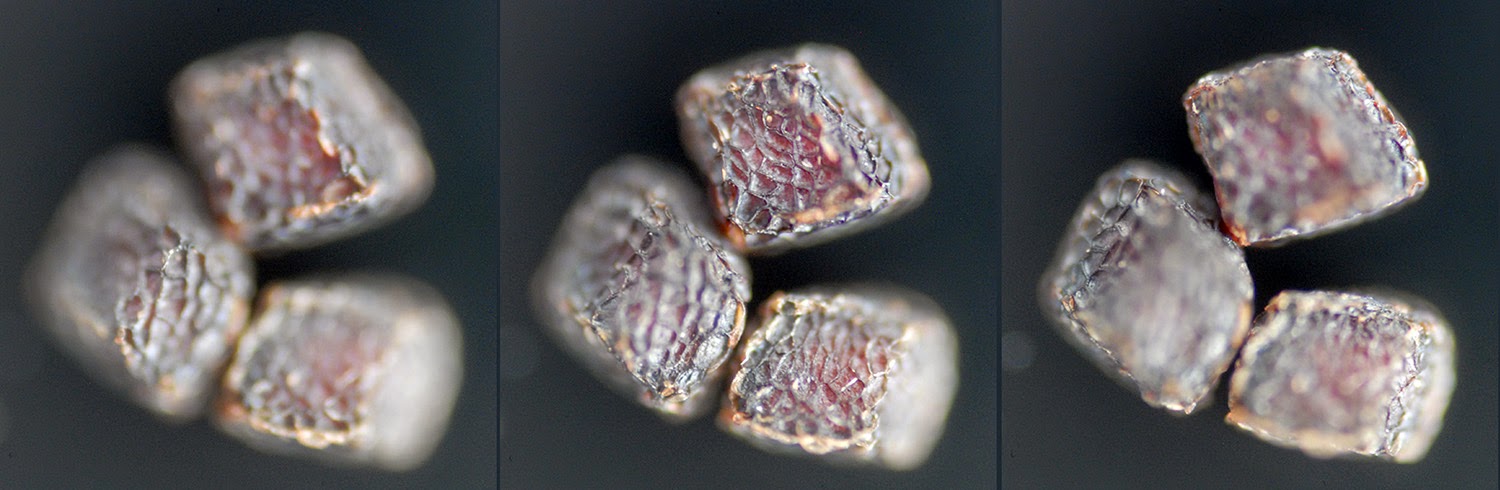
Seeds and Capsules: Though it is unlikely that anyone would be able to photograph Primula seeds while in the field, it is possible to do so later. Primula seeds by themselves can not determine a specific species, but it can point to a particular Primula Section.
Primula seeds
Seed capsules can also be used to determine an identification to the Section level. Of course we travel to see and photograph flowers! However, last years seeds capsules may still be present even if all the seeds have been dispersed or perhaps some new capsules are forming. A convenient image to make shows the flowering plant together with the old flower stalk and capsules.
Seed capsules: P. sikkimensis (L), P. calderiana (R)
Habitat and Location: A image of a wider view of the plant in habitat gives us ecological information plus relative plant size and population variation. Knowing the location of where the Primula was photographed in the wild helps me define distribution patterns. GPS coordinates can be determined in the field, or later estimated using Google Earth, but even general locations to the nearest place can help.
P. allionii habitat
Putting it all Together
I'm pleased to see any Primula images, but if you have time, a detailed study like that shown below of Primula boreiocalliantha is the pinnacle of excellence. Even common species need to be documented!

Field Checklist of images:
  
  1. Habitat – wide view showing the plants and their environment. Note aspect, moisture, base rock (granitic, limestone) and plant associations.
  2. Full plant – with measuring scale to show accurate height (or some indication of size, even if it is a finger or a hand.
  3. Leaf study – If permissible, remove a few leaves from several individuals by gently tugging downward from the stem so that the whole petiole remains with the leaf. Observe several plants and chose leaves showing variations. Image BOTH sides the leaves, side by side, with a scale. Take magnified images of any hairs, glands or pits on the leaf surfaces.
  4. Inflorescence study – Image the flowers from the back or side to show the calyx, bracts, tube, pedicels and upper scape. Note that pin and thrum forms may have different shaped tubes. Pull back a calyx lobe and document any farina inside.
  5. Flower study – Image the front of a pin flower and a thrum flower. If this characteristic is not obvious in the image, then cut a flower in half lengthwise and photograph it. If you suspect the species is homostylous, image several split flowers. If the flowers vary in color and size, and it is permissible, remove a few flowers and image them together with a scale to show relative variation. Tilt up flowers which hang down, to image the face of the flower.
  6. Farina – It can be hard to determine farina color from digital images due to color rendition problems and farina reflectivity. Observe and write down the farina color. Make sure your images show which parts have farina.
  7. Capsule study – If the plant is in seed or old seed capsules linger from previous years, image the seed capsule. Fresh capsules may be cut in half lengthwise to show the internal seed arrangement. Image the height of the scape with a measuring scale as the scape lengthens when the plant is in seed. If possible, show together the whole plant with old seed scape, and new flowering scape.
  8. Leaf rosette – Image the rosette (non-flowering plant is easiest) showing the new leaves unfurling in the center.
  9. Resting buds, bud scales - If the plant is imaged in early Spring, or late Fall, image the resting bud, documenting any farina present. If the plant is in flower, pull the leaves back to show any bud scales or a sheathing base.
  10. Root/stolon study – If permissible, remove a plant from the ground, and image the colors and structure of the roots. Image any stolons.
  11. Fragrance – note the fragrance of the flowers and/or roots and write it down.
* Notes can be written on paper in the field and photographed with the plant. Similarly the display of a GPS can be photographed with a plant if the camera is not GPS enabled.

 
Remember: Take as many Primula images as you can....and then take one more!

Pam Eveleigh © 2017
It's About Time

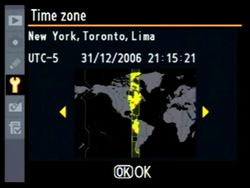
Botanical travel can take you close to home or far away, perhaps, the other side of the earth.  The nearest antipodes to me is Port-aux-Francais in the Kerguelen Islands which would be interesting to visit, but it isn’t a place where Primulas grow. My last botanical trip started in Kunming, China after 23 hours of travel and all I wanted to do after landing was to eat and sleep. But in the list of many things you need to do when you arrive, there is one task people forget to do – set the clock on your camera to local time.
Set the local time on your camera
Why would you want to do that? If you are like me, when you get back home you are faced with the daunting task of organizing thousands of images taken on the trip. With the help of photo manager software you can quickly find that special image later on when putting together a presentation or sharing with friends. Some of these programs are free, others you pay for either by buying outright or by renting monthly. I use Adobe Lightroom.
Exif data
Every time you take an image with your camera, basic information or metadata is stored with that image in exchangeable image file format (Exif). The data includes the make and model of your camera and the date and time the image was captured. Photo manager software allows you to sort based on the Exif data included in your images. You can find all the images taken on a particular date or maybe those taken with a particular camera, if you were using more than one (or a camera and a cell phone for instance). If you haven’t set your camera time, some of your images may appear to have been taken near midnight and others the next day, when in reality all of the images were taken in the afternoon on only one day!  If you can accurately sort the images by time, then it makes it easy to find all the images taken at a particular time and add tags to describe locations and plant names to your images. You can also rate your images. With this done, it is a simple task to find your very best images of a plant taken at specific place.

Don’t forget to set you camera clock back when you get home!

An Interview with Pam Eveleigh


Recently, Pam Eveleigh, creator of this website Primula World, was interviewed by Jennifer Connell for her gardening blog called "Three Dogs in a Garden". The full interview can be found here.

Bringing Seeds into Focus


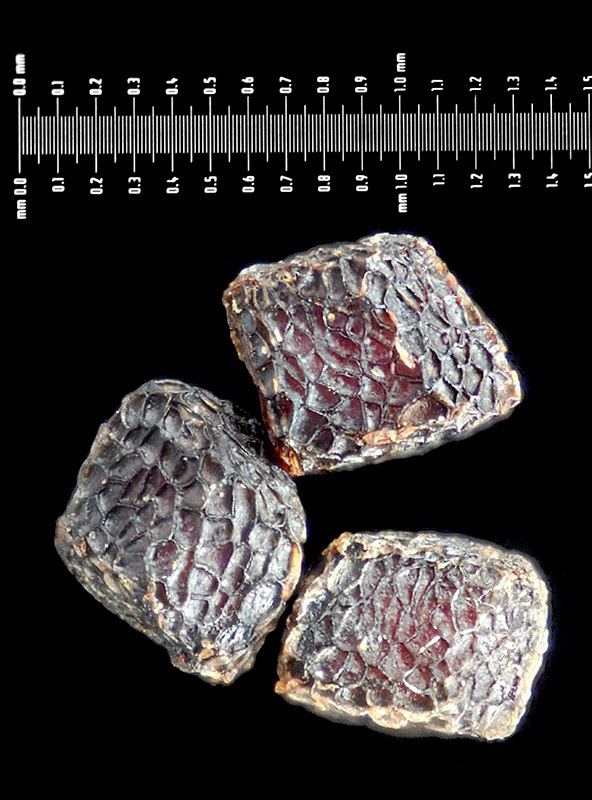
Have you ever seen the book “Seeds:Time Capsules of Life” by Kesseler & Stuppy? It’s a gorgeous coffee table book of false-colored scanning electron microscope (SEM) images of seeds. These types of images can show wonderful detail at the microscopic level and give us more information to help distinguish between species. Primula seeds aren’t quite as fascinating as some of the seeds depicted in the book, but they do have minute details that make them interesting (see the SEM image above of a Primula seed that I false-colored ).  And though you can buy old scanning electron microscopes on ebay, this technique is out of reach for the majority. However, taking optical images of seeds can be done with minimal equipment, just as long as you are able produce magnification in the range up to 10X. This can be done with specialized lenses (like Canon’s MP-E 65mm), by reversing wide-angle lenses (like 24mm or 20mm) with a reversing ring (like Nikon’s BR-2A) or by attaching microscope lenses to the camera directly with an adapter (see this page on photomacrography.net). Or you can take images through a microscope using a camera adapter. If you want to add a scale to your image a micrometer slide is useful.
Focus slices
 
Primula brachystoma seeds focus stacked

The problem you encounter when taking magnified seed images is that the whole seed will not be in focus in a single image because of the narrow depth-of-field. In order to create an image with the whole subject in focus, we use a processing technique called "focus stacking". There are many good programs that do this as listed in the link, but I happen to use Zerene Stacker. This program combines the in-focus parts of multiple images taken with overlapping focus points to create an image that has the subject completely in focus.

So why would we want to look closely at Primula seeds?

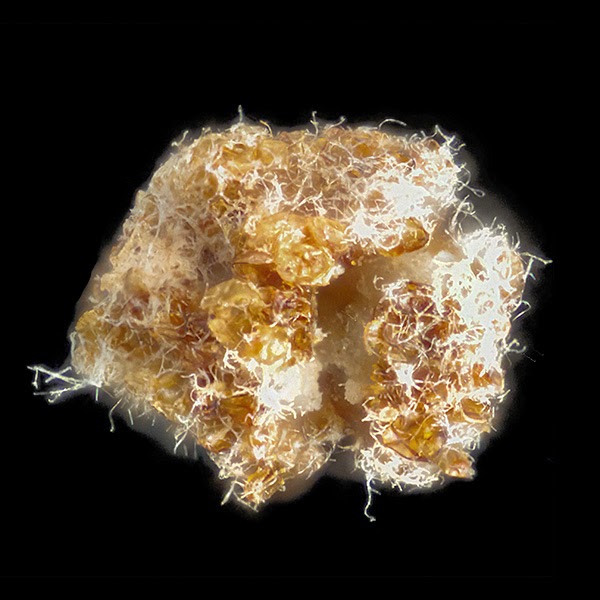
A broken Primula agleniana seed attacked by fungus

Do you know what you area getting in a package of seeds? Even if you don't take an image of your seeds, looking at the seeds closely may reveal that there is more than one type of seed in a package, there is chaff or sand, or that some seeds are broken and molding. Keeping a images of your seeds allows you to compare with seeds that are supposed to be of the same species and can uncover misidentifications.
And it's really fun to uncover the hidden beauty of Primula seeds!

My Camera has the Blues

Color is a tricky thing when describing and photographing flowers. Not only do people differ in their understanding of what is meant by color terms, our cameras “see” colors in different ways than we do.

Primula nanobella color variation.
Words used to describe the most common range of Primula flower colors include violet, blue, mauve, lilac, pink, pinky-violet, blue-violet, amethyst, rose, violet-blue, claret-red, red, wine, purple-blue, purple, magenta, crimson, salmon, magenta-crimson, rose-crimson, rose-purple, lilac-mauve, and rosy-purple. It’s hard to figure out these colors unless you can compare them side-by-side.
 
Ah, but we can take a picture of a Primula flower described as “lilac-mauve” and that will show precisely what is meant! Well, except there are problems with how colors are reproduced in an image.

Light has a color temperature, measured in Kelvin (K). Numbers over 5,000 K represent the cool, blue end of the scale and less than 3,000 K represents the warm, red end of the scale. Often when we speak about color temperature in relation to digital cameras we talk about the white balance.


Most cameras have pre-sets for white balances such as “sunny”, “cloudy”, and “auto” which tells the camera what color temperature to expect in the scene so that the color can be balanced back to neutral. On the “sunny” setting more blue is added to the image, and on “cloudy” more yellow is added. If you have your camera on the wrong setting you will get a strong color cast to your image (which can be used creatively). In the image below, the same Meconopsis has been photographed with different white balance settings. The left image has a slight blue color cast, and the right image has a strong yellow color cast. Without the visual clue of the background to help us see the color cast, we could think the flowers in the images were different colors.
Same plant with different white balances
The camera model used to take images can also cause problems with color. Camera manufacturers add internal infrared blocking filters to their cameras to add clarity to images. This also cuts out some of the visible red in images so Primula flowers can turn from violet to blue depending on the camera used. Fortunately software can be used to correct for this, but this requires some knowledge of the actual flower color or knowledge of the camera and how it represents colors.

Two cameras record the same species differently